Cash, Then Regret: The Inspection Checklist for a Second-Hand Fire Stick or Android TV Box

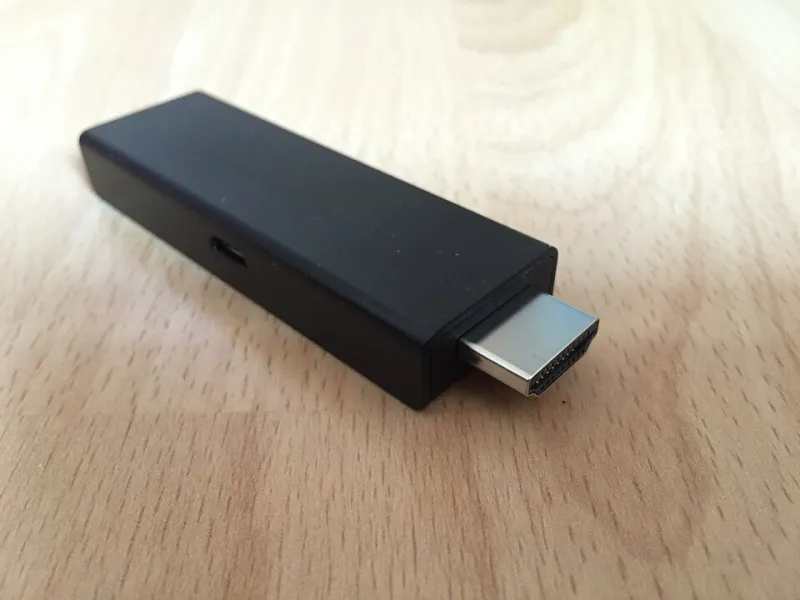
Photo: ストリームメディアコーポレーション, Public domain, via Wikimedia Commons
There is a particular kind of optimism that takes over when you see a Fire TV Stick 4K listed for fifteen pounds. The new one is sixty. Surely a streaming stick is a streaming stick, and surely nobody would sell you a dud.
Well. I have watched people buy boxes that were still registered to a stranger's Amazon account, sticks with a remote that would not pair and no charger in the bag, and Android TV units running firmware so old that iPlayer had quietly stopped supporting them. None of these are rare. All of them are avoidable with about ten minutes of checking, most of which you can do before money changes hands.
The account lock is the number one deal-breaker
Start here, because it is the one problem you cannot reliably fix yourself.
A Fire TV Stick is tied to an Amazon account until it is deregistered. If the seller simply factory reset it without deregistering, the device can still behave oddly — the odd prompt, a stubborn registration screen, or in the worst cases a device that Amazon's support team has to untangle for you. Ask the seller to deregister it while you watch, from the Amazon website under Account, Content and Devices, Devices. If they cannot or will not, walk away. There will be another listing tomorrow.
Android boxes have a similar trap. Google's factory reset protection will lock a device to the previous account after a wipe. If a reset Android box asks for a PIN or an email that is not yours, put it down. No amount of forum reading will get you past that cleanly.
Remotes, pairing and the missing bits
A streaming stick without a working remote is a paperweight with HDMI on one end. On a Fire TV, hold the Home button for around ten seconds to put the remote into pairing mode; if it will not pair after a battery swap and a fresh set of cells, treat the remote as dead and price a replacement into the deal — they are not cheap, and third-party substitutes can be hit and miss.
Then check the obvious inventory. Is the power adapter included? Is the HDMI extender included, which matters more than people think when a stick is jammed against the back of a wall-mounted telly? Any corroded batteries left in the compartment? That last one is a decent proxy for how the seller treats their kit.
Power adapters are not interchangeable, whatever the drawer says
Fire TV Sticks are fussier about current than their tiny size suggests. Running one off a TV's USB port, or off a phone charger rated at a modest one amp, produces exactly the symptoms people then blame on their broadband — random reboots, drops in the middle of a match, a device that refuses to wake.
So look at the label on the adapter. Match the rated output to what the device expects, and if the seller has swapped in a generic charger, assume it is wrong until proven otherwise. Also check the plug type. Plenty of second-hand stock has come from the US or Europe, and a two-pin adapter with a travel plug bodged onto it is a fire risk and an annoyance in equal measure.
Firmware age: the quiet killer
This is the check most buyers skip, and it is the one that decides whether the box will still run the apps you actually want.
Fire OS has moved on considerably. An older Fire TV Stick stuck several major versions behind will still stream, but app support for the big UK names — BBC iPlayer, ITVX, Channel 4, My5 — gets patchy as time passes, and some devices simply stop receiving updates altogether. Check under Settings, My Fire TV, About for the software version, and check whether the device still takes an update when you prompt it.
On the Android side, the situation is worse. Cheap generic boxes sold in their thousands two or three years ago often shipped with Android 9 and never saw another build. Before you buy, ask which Android version it is on and search whether your key apps still support it. If the seller does not know, that is your answer.
The DRM question nobody asks until it is too late
Here is a subtlety worth knowing. Streaming apps check what is called Widevine certification before they will play in high definition. Some cheap or grey-import Android boxes only carry level 3 certification rather than level 1, which means the app works but caps out at standard definition. On a 55-inch screen, that is a visible difference.
The practical test is simple: open iPlayer or Netflix and look at what resolution the stream reports. If the box is claiming HD but the picture looks soft, you have your explanation.
The five-minute test routine, in the seller's kitchen
Do this before you pay, and do not be apologetic about it. Any honest seller expects it.
- Power it up cold and time the boot. Over a minute on a stick is a warning sign.
- Join your own phone hotspot if there is no Wi-Fi to hand, and confirm it sees 5GHz networks.
- Open a live channel and let it run for two full minutes. Intermittent faults need time to appear.
- Play something on BBC iPlayer. It tests the app, the DRM and the network in one go.
- Press every remote button, including voice search, and check the volume controls reach your telly.
- Factory reset it in front of the seller, then set it up far enough to confirm it is not locked.
If it survives all six, you are probably looking at a genuine bargain rather than somebody else's problem.
Warranty, receipts and the awkward questions
Where you buy changes your protection enormously. A high street trade-in chain will typically give you a decent warranty and a no-quibble return window, and that convenience is worth paying a bit more for. eBay gives you the buyer protection process. Facebook Marketplace and Gumtree, with cash in a car park, give you nothing at all.
Ask when and where it was bought, and whether the receipt still exists. Amazon warranties do not travel with the device — they belong to the original purchaser, and the seller cannot transfer that to you. If a listing is vague about age, assume the oldest plausible date.
The short verdict
A second-hand streaming stick is a perfectly sensible buy at the right price, and a lot of people have put together very capable IPTV setups for under twenty pounds by shopping carefully. But the savings only hold if you check the account lock, the remote, the adapter and the firmware before cash leaves your hand. Do that, and the gamble is not really a gamble at all.