Deposit-Safe Streaming: A Renter’s IPTV Setup That Doesn’t Need a Drill
Renting gives you plenty to think about without adding “will this void my deposit?” to the list every time you fancy a better telly setup. Yet that’s exactly where a lot of UK cord-cutters end up: a flat with decent broadband, a router in the hallway, a TV in the lounge, and a landlord who has strong feelings about holes in the wall.
The good news is that a reliable IPTV setup doesn’t need drilling, permanent cabling, or a six-month negotiation with your letting agent. You just have to treat the rental as part of the design brief. Everything should be removable, reversible, and sensible enough that you can pack it into a couple of boxes on moving day.
Start with the landlord test, not the hardware list
Before you buy another streaming box or a fancy mesh kit, walk around the flat and ask one question: what would I have to undo before check-out? Anything screwed into a wall, stapled along a skirting board, or stuck down with industrial-strength adhesive is a future argument. Anything that sits on a shelf, hangs from a tension rod, or peels off cleanly is fair game.
That doesn’t mean your setup has to look like a student house. It means choosing kit that respects the walls. In 2026 there’s no shortage of renter-friendly options — you just need to be honest about what your walls are made of. Victorian plaster, new-build drywall, and tile all behave differently when you stick something to them.
Cable routes that come off as easily as they go
Permanent cabling is the classic rental mistake. A neat run of coax or Ethernet under the carpet feels brilliant until you realise you’ve created a move-out job. Instead, plan routes that are visible but tidy, and removable without tools.
Adhesive trunking is the obvious starting point. The key is surface preparation: clean the wall, let it dry fully, and avoid textured wallpaper or freshly painted surfaces. Cheap trunking with weak clips will sag; overly aggressive adhesive will take paint with it. A middle-ground product from a known brand is usually worth the extra few quid. Run cables along skirting boards and door frames rather than diagonally across a wall — it looks intentional and gives you fewer sticky pads to remove later.
For shorter runs, reusable cable ties and adhesive-backed clips work well. Avoid anything described as “permanent” or “heavy duty” unless you’re happy to repaint. If you need to cross a doorway, consider a flat floor cable cover rather than tacking cable above the frame. It’s not glamorous, but it lifts cleanly and stops the cat from treating your Ethernet lead as a toy.
No-drill mounting without the wobble
Wall-mounting a TV is usually off the table in a rental, but you can still get the screen up to a sensible height. Tension-mounted shelves and stands that use the weight of the TV are one option, though they’re not suitable for every wall or every telly. A freestanding TV stand with a built-in bracket is often the safer bet: no wall contact, no drill, and easy to move when you rearrange the room.
For smaller items — a streaming box, a mini aerial, a small switch — adhesive shelves and hook-and-loop pads are fine as long as you respect the weight limit. Don’t hang a router from a Command strip and hope for the best. Put heavier kit on furniture, and use adhesive only for lightweight cable management and tiny devices.
If you’re hiding kit behind the TV, a simple VESA-backed shelf or a strap that attaches to the stand can keep things off the floor without touching the wall. Just leave enough ventilation. Streaming boxes run warm, and a cramped cabinet is a reliable way to introduce stutter that looks like a network problem but isn’t.
Powerline versus mesh in a rented flat
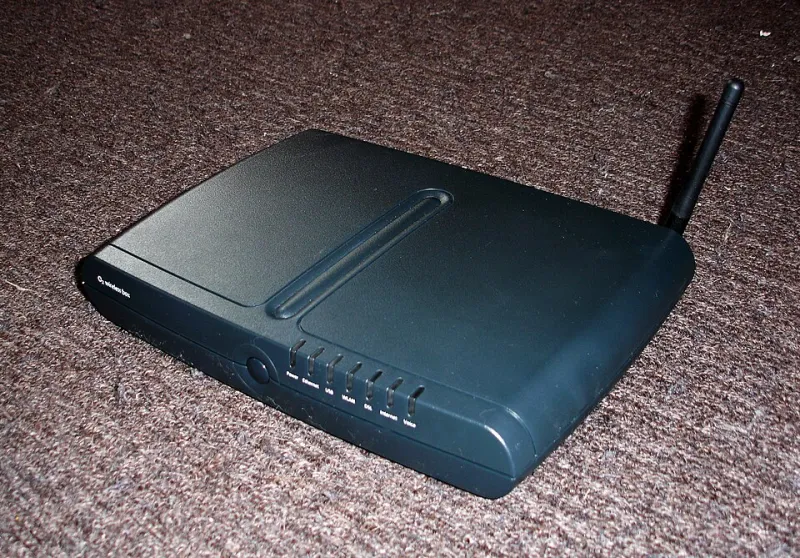
This is the decision that catches most renters. The router is in the hall, the TV is in the lounge, and the Wi-Fi signal has to negotiate a wall, a chimney breast, and next door’s microwave. You have two sensible no-drill options: powerline adapters or a mesh system.
Powerline adapters send data over the existing electrical wiring. They’re brilliant when the router and TV are on the same ring main and the wiring isn’t ancient. They’re less brilliant across different circuits, behind surge protectors, or in flats where the electrics have been “improved” by three different landlords. Buy a kit with a pass-through socket, plug it directly into the wall, and test it at peak time — around 9pm — before you decide it’s a keeper. If the speeds collapse when the heating kicks in, send it back.
Mesh Wi-Fi is more flexible. A two-node system can cover most one-bed flats, and a three-node kit starts to make sense in a longer rental or a place with thick walls. The catch is that mesh nodes still need power and a sensible position. Don’t tuck one behind the telly and expect magic. Put it halfway between the router and the dead spot, ideally on a shelf rather than on the floor.
For IPTV specifically, stability matters more than headline speed. A 30–50 Mbps connection is plenty for most HD streams if it’s consistent. What you’re trying to avoid is the 8pm wobble when everyone in the building starts streaming. Wired where you can, mesh where you can’t, and powerline only after you’ve tested it in your actual flat.
The 9pm test and the placement rules
Once everything is connected, do a proper peak-hour test. Watch a live channel, switch to another, and check the guide loads without a long pause. If the picture breaks up only when the microwave runs, that’s interference, not a bad IPTV service. Move the mesh node or powerline adapter away from the kitchen and try again.
Keep the router off the floor and out of cupboards. Keep the streaming box ventilated. Keep the TV’s network cable away from power leads where possible. None of this requires drilling, and all of it makes a difference in a small flat where signals have to bounce around furniture.
A move-out checklist that keeps the deposit intact
When moving day arrives, you want a setup that comes apart in an afternoon. Work through this list:
- Remove adhesive trunking slowly, warming it with a hairdryer if it resists. Peel back towards the wall, not away from it.
- Take down adhesive shelves and hooks, then clean any residue with the mildest product that works. Test on a hidden patch first.
- Coil and label cables. Future-you will thank present-you.
- Photograph the walls before you clean them, just in case there’s a disagreement about what was already there.
- Reset any smart plugs, mesh nodes, or streaming boxes you’re leaving behind — and take your accounts with you.
- Check the inventory. If you replaced a landlord’s aerial cable, put the original back.
The bottom line
A rented flat doesn’t have to mean a second-rate IPTV setup. Choose removable cable routes, avoid permanent fixings, and treat powerline and mesh as tools to be tested rather than miracles to be trusted. Do that, and you get a setup that works on a Tuesday night, comes apart without drama, and leaves the deposit where it belongs: back in your pocket.