Dongle Economics: Wired Internet for Fire Sticks and Chromecasts That Actually Holds
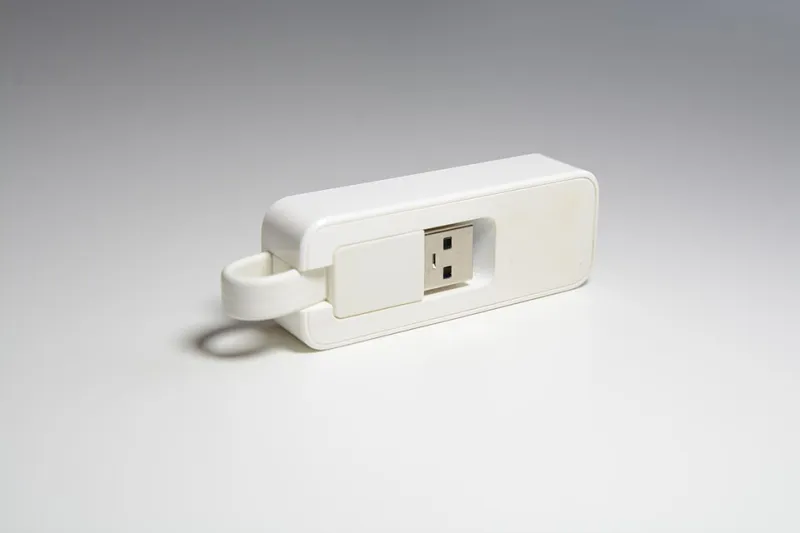
Photo: Hayden Schiff , CC BY 4.0, via Wikimedia Commons
There's a particular kind of UK flat where a Fire Stick simply cannot win: second floor, router in the hallway, six neighbouring networks all squatting on the same 2.4GHz channel, and a landlord who installed the hub in 2019 and has not thought about it since. The stick works fine at eleven in the morning. At eight on a Saturday evening it develops opinions.
The usual advice is 'buy a mesh system'. That's a £150 answer to a £15 problem, and it's often the wrong answer. If your streaming stick sits within a cable's reach of the router, a USB Ethernet adapter will beat any wireless solution on stability — and it'll do it for the price of a takeaway.
What you're actually buying
Most of these adapters are three things in one plastic shell: a USB-to-Ethernet chip, a small hub, and (on the good ones) a power passthrough so the stick still gets fed. The chip matters more than the brand on the box.
Two chipset families cover nearly everything that works: ASIX AX88772 (USB 2.0, 100Mbps) and Realtek RTL8153 (USB 3.0, gigabit). Fire OS and Android TV both carry drivers for these, which is why TP-Link's UE300, Ugreen's compact adapter and the Amazon Basics model all tend to just work. No-name adapters listing no chipset at all are a lottery.
You do not need gigabit. A 4K IPTV stream is typically 15–25Mbps; HD is 5–8Mbps. A 100Mbps link is comfortably four times what a single stick will ever pull.
Fire TV: the OTG route
Fire TV Stick 4K and 4K Max have a micro-USB port on the side. To get Ethernet into one you need a micro-USB OTG adapter or, more sensibly, a powered micro-USB hub with an Ethernet port built in. Amazon sells an official Ethernet adapter for older Fire TV models, but the third-party hubs are cheaper and generally more useful because they give you the power passthrough as well.
The setup is: hub into the stick, Ethernet cable into the hub, the stick's original power supply into the hub's power port. Then in Settings → Network you should see a wired connection appear. Some Fire OS versions keep Wi-Fi connected alongside it, so switch Wi-Fi off manually to make sure traffic actually uses the cable.
Worth knowing: if you're buying new and you've got the space, the Fire TV Cube has Ethernet built in. That's the tidy answer if you haven't bought anything yet.
Google TV: the USB-C puzzle
The Chromecast with Google TV (both HD and 4K) charges over USB-C, and that same port can carry Ethernet — but only through a powered hub. Google's own Ethernet adapter for it has been hard to find for a while, so the practical route is a USB-C hub with Ethernet and PD passthrough, paired with a decent USB-C charger. The newer Google TV Streamer has a proper Ethernet port on the back and sidesteps the whole exercise.
One caution: not every cheap USB-C hub exposes its Ethernet chipset in a way Android TV recognises. Buy from a brand that names the chip, and buy somewhere with a returns window you're happy to use.
The power rules nobody mentions
This is where most failed attempts go wrong, and it's almost never the adapter's fault.
- Never power the stick from the TV's USB port. That port typically supplies 0.5A and it'll brown out under load. Rebooting sticks, black screens and 'no signal' messages are nearly always this.
- Budget for more than the bundled supply. The stick's own PSU was sized for the stick. Add a hub and an Ethernet chip and you want a 5V/2.5A or 3A supply. They cost about eight quid.
- Unpowered hubs are a false economy. They work until they don't, and the failure mode looks exactly like a broken stick.
- If the device reboots the moment you plug the adapter in, it's power, not compatibility. Swap the supply before you return anything.
When a dongle genuinely beats a mesh upgrade
- The stick is within cable reach of the router — even around a door frame. A 10m flat Cat5e cable is under a tenner.
- The problem is confined to one room and gets worse in the evening.
- You're in a flat or terrace with heavy overlapping Wi-Fi. Wired sidesteps the airwaves entirely.
- You rent and can't drill. Flat cable tucks under carpet edges and around door frames without leaving a mark.
- You care about live sport more than raw throughput. Wired doesn't add bandwidth, it removes jitter — and jitter is what makes a stream stutter and re-buffer.
When it doesn't
If the whole street's broadband is congested at nine, a cable in your front room changes nothing — that's a different problem entirely. If your cable run would be twenty metres across a hallway, a mesh node starts to look reasonable. And if the stream buffers at three in the afternoon as well, you're chasing a provider-side issue, not a Wi-Fi one.
Setup checklist
- Hub or OTG adapter into the stick, Ethernet into the hub, power into the hub's PD port.
- Confirm the link light on the adapter is lit.
- Fire TV: Settings → Network; Google TV: Settings → Network & Internet → Ethernet.
- Turn off Wi-Fi so traffic can't fall back to wireless.
- Run a speed test, then watch a 4K stream for twenty minutes rather than thirty seconds.
- Check your router's client list — the stick should appear with a stable IP and no dropouts in the log.
What to expect afterwards
Latency to your router drops from anywhere between 5 and 40ms to a flat 1–2ms. Jitter, the spiky cousin of latency that causes buffering, essentially disappears. Bandwidth stays exactly the same, because your line is your line.
For roughly £25 all in — dongle, cable, better power supply — you get a streaming stick that behaves like a wired box. Try that against a mesh kit and see which one you'd recommend to a mate.